You’ve poured months into your Shopify store. You have solid products, branding you actually like, and a design that doesn’t look like everyone else’s. And still – the organic traffic is flat. Sales aren’t where you pictured them.
Usually, the answer is more boring than dramatic. It’s not the market. It’s not the algorithm being mean to you. It’s SEO mistakes. Small ones, mostly. The good news is that almost every one of these mistakes is fixable. Clean them up and you start pulling free traffic that converts, because it’s already qualified by intent.
If you want a step-by-step list, use our Shopify SEO checklist.
What Are the Most Common Shopify SEO Mistakes that Shopify Store Owners Make?
Running an online store can feel like spinning plates. Shopify gives you a decent base (it’s genuinely one of the easier platforms to work with) but the SEO side has plenty of small traps. Some are obvious. Most aren’t.
They’re little gaps that add up until, one day, you wonder why a competitor with a worse product is outranking you.
Here are the usual suspects.
Ignoring the Basics of On-Page SEO
A lot of owners pour energy into product photos and pricing. Reasonable – those matter. But issues arise when the title tag says “Product | Shop Name,” the meta description is blank, and the headings are whatever the theme decided.
Google looks at that page and shrugs. So does the shopper scanning search results. Both walk away with very little to go on, and your rankings (and your click-through rates) reflect that.
Skipping Keyword Research, or Doing It on Vibes
Owners assume they already know what their customers type into Google. Sometimes they do. Often they don’t. Without data it’s guesswork dressed up as strategy. You target terms nobody searches for, or terms ten established brands already own, and you miss the high-intent middle ground where the actual buyers live.
Without a keyword plan, your product titles, descriptions and blog posts speak a slightly different language than your customers do. Close, but never quite matching.
Duplicate Content You Didn’t Know You Had
This one’s sneaky. Shopify can spin up duplicate content without you lifting a finger – product variants, collection filters, near-identical descriptions across similar products.
When the same content sits on multiple URLs, Google gets confused about which one to rank. Sometimes it splits the ranking power. Sometimes it just ignores half the pages. Either way, you lose.
Messy Site Architecture, Confusing Navigation
Structure matters more than people think. Both for Google and for the human who landed on your store with three tabs already open.
Plenty of Shopify stores have menus full of “Featured” and “New Arrivals” – names that mean nothing in search. As a result, collections become enormous grab-bags or are tiny and pointless.
If shoppers can’t find what they came for in about six seconds, they’re gone. Similarly, if Google can’t read your hierarchy, your most important pages quietly underperform.
Not Bothering With Speed
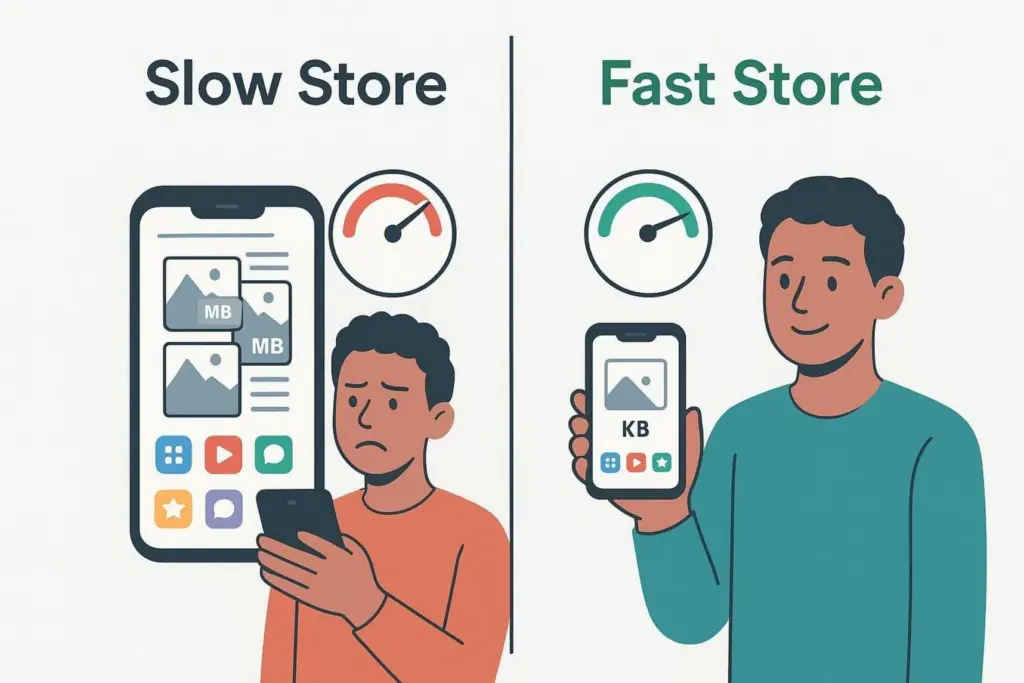
Slow stores lose shoppers, and Google measures page experience, including loading speed, as part of how it understands a site.
The culprits are familiar: bloated image files, heavy themes loaded with features you don’t use, a stack of third-party apps each adding their own scripts.
To shoppers, slow means broken. To Google, slow means bad experience.
Treating Mobile as an Afterthought
In 2026, mobile is the store: most shoppers browse on phones. And yet, we frequently encounter slow pages, layouts that overflow, buttons too small to tap, or menus that hide the things people actually want.
Google uses mobile-first indexing, so if your mobile experience is rough, your rankings take the hit too.
Product Descriptions That Don’t Sell
Descriptions are where a lot of stores phone it in. You should avoid relying on short, generic copy. Or worse – pasting from the manufacturer the same text already sitting on twenty other sites.
Titles and meta descriptions should get the same treatment. Avoid generic and interchangeable text.
Without strong, keyword-aware copy, product pages rank worse and earn fewer clicks even when they do show up.
Alt Tags? What Alt Tags?
Images are everywhere in e-commerce, and image SEO is everywhere on the list of things owners forget. We’ve seen tons of files uploaded as “IMG328.jpg,” alt text left blank.
Alt text helps Google understand what’s in the picture, supports image search visibility, and makes the store usable for shoppers relying on screen readers. Skipping it is leaving a small but real opportunity on the table.
URLs Nobody Cleaned Up
Shopify has default URL patterns, and most owners leave them alone. The result is long, unclear URLs with extra parameters trailing off the end.
Shopify handles some of it for you, sure. But it’s still worth making URLs as readable as you can. Clean URLs help search engines, and they help the person deciding whether to click.
Sitemaps You’ve Never Actually Looked At
Shopify generates an XML sitemap automatically. That’s helpful. But auto-generated isn’t the same as correct.
Your sitemap might be missing pages you care about. Or it might be including pages you’d rather Google forgot.
If you’ve never opened Google Search Console to check, you don’t know – and the problems compound quietly.
Almost No Internal Linking
Internal links connect your pages. A lot of Shopify stores barely use them. Without internal links, important pages don’t get the authority they should from the rest of the site, and shoppers don’t stumble onto related products or collections.
Internal linking is also one of the strongest signals telling Google which pages matter most.
Structured Data Either Missing or Half-Finished
Schema markup is the code that lets Google show the fancy stuff in search results – prices, stock status, star ratings, FAQ snippets. Shopify includes some basic schema by default, but it’s often incomplete or never validated.
When a competitor’s listing shows star ratings and a price and yours doesn’t, you don’t need to outrank them. They’ve already won the click.
Apps. Too Many, or the Wrong Ones
Apps cut both ways. They can solve a real problem in five minutes, or they can quietly turn your store into a slow, script-heavy mess.
Too many apps, or poorly built ones, drag down speed and create conflicts. But ignoring genuinely useful tools – like a decent image optimizer – holds you back, too. The sweet spot is a small set of apps that earn their keep.
Robots.txt: Handle With Care
Every Shopify store has a default robots.txt controlling what search engines crawl. Shopify limits how much you can edit it.
Sometimes pages you want indexed aren’t getting crawled the way you’d expect. If you don’t understand Shopify’s rules you can accidentally block content that should be showing up in search. People do this more often than they’d like to admit.
How Do These Mistakes Actually Hurt Your Store?
It’s not just rankings. The damage spreads.
Less Organic Traffic
Unoptimized pages don’t rank, and pages that don’t rank don’t get seen. Especially anything past page one – which, statistically, almost nobody clicks. The fallback is paid ads, and paid ads have a habit of getting more expensive every quarter. Strong organic rankings, on the other hand, bring a steady stream of visitors who were already looking for what you sell.
Lower Conversions
SEO problems travel with usability problems. Weak copy doesn’t convince anyone. Slow pages frustrate. Missing trust signals – like the star ratings that schema can surface in search – chip away at confidence before the visitor even clicks. A store full of SEO gaps is, almost always, a store that’s harder to buy from.
Higher Bounce Rates & More Abandoned Carts
A page that loads slowly, breaks on mobile or feels clunky to use? People leave. Fast. Bounce rate climbs, the negative signal compounds, and meanwhile cart abandonment goes up too – straight-up lost sales, most of them preventable.
Missed Shots at Google Shopping
Google Shopping can send you real buyers, the kind already comparing prices. But it depends on clean product data: accurate titles, pricing, availability, structured information. Weak on-page SEO and weak schema mean weaker listings – when they show up at all.
Fixing On-Page SEO in Shopify
Now, the practical part. The stuff you can actually do this week.
Titles, Metas, Headings
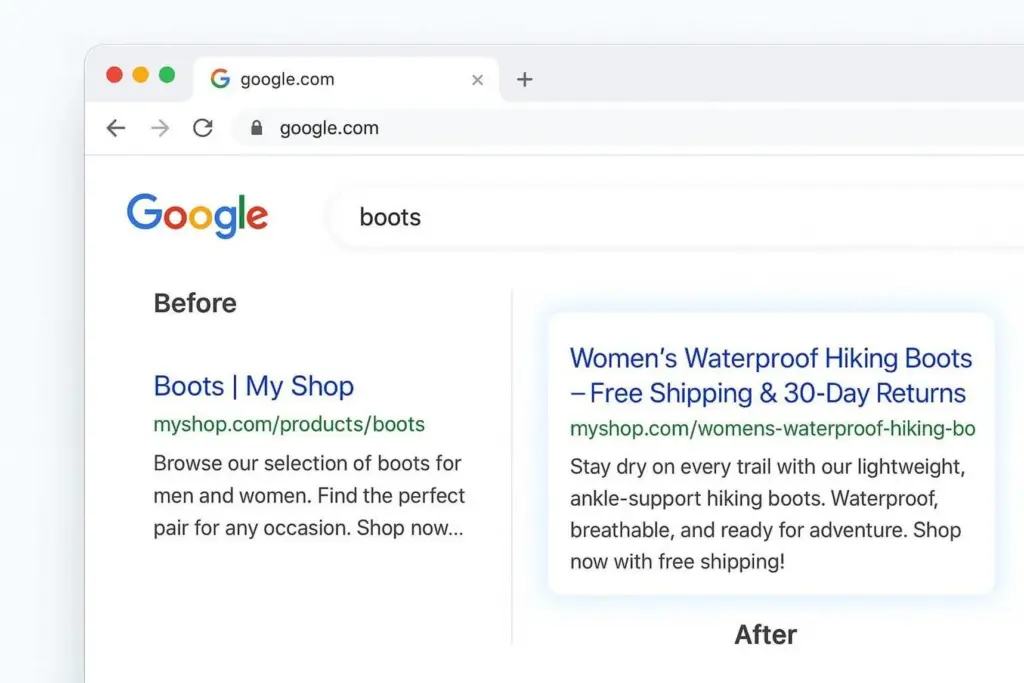
Think of your search listing as a sign. Or, better, a small ad. For every product, collection and page, write a unique title tag. Main keyword near the start, then a clear benefit. Instead of “Boots | My Shop,” try something like “Women’s Barefoot Boots – Flexible Sole & 24/48-Hour Delivery | Brand Name.” It tells the searcher what they’re getting and gives them a reason to click.
Meta descriptions don’t directly move rankings, but they move clicks. So treat them like that little ad. What the page is about, what makes it worth buying from you, and a quick reason to act – fast shipping, free returns, a guarantee, whatever’s true.
For headings: one H1 per page, matching the main topic. H2s and H3s to break the content into sections people can scan. Secondary keywords woven in where they fit naturally, not crammed in. If you’ve got a big catalog, a tool like Matrixify can update fields in bulk before you go and hand-polish the top pages.
Product Descriptions That Don’t Read Like a Spec Sheet
Avoid generic copy. Avoid copy-paste from the manufacturer’s site. Aim for descriptions that are unique, specific, and actually helpful.
Lead with benefits. “100% cotton” is a fact; “soft, breathable cotton that doesn’t get clammy by lunchtime” is a reason to buy. Use the words your customers actually use – drop them in naturally, don’t repeat them four times in a row. Add a small story or use case so the shopper can picture themselves using the thing. And back it up with strong visuals: good photos, the occasional video. Words and pictures working together.
Alt Text on Every Image
Specific, descriptive, natural. “Women’s minimalist running shoe with flexible sole” beats “shoe.” Add keywords where it fits the actual image. And rename your files before upload – womens-barefoot-running-shoe.jpg is a small thing, but small things stack.
Canonical Tags, the Duplicate-Content Fix
Canonical tags tell Google which version of a page is the real one. Start by checking what’s getting flagged in Search Console. Then look at the usual culprits: product variants creating competing pages, collection filters generating duplicates, tag pages spawning indexable URLs you never meant to publish. Use logic in collection.liquid (or an app) to control indexing and canonical settings so tag pages stop creating problems. And, again – unique product descriptions. No manufacturer text. No copy-paste between similar products.
URL Structures: A Few Habits Worth Building
URLs are addresses. Clear ones help users trust the link they’re about to click, and help Google figure out what’s on the page.
Short, clear, keyword-aware, consistent. That’s the recipe. yourstore.com/men-leather-jacket reads instantly; a string of parameters and random characters doesn’t.
Shopify generates handles for you, but you can – and should – edit them. Trim the filler. Add the keyword. Keep in mind that Shopify usually keeps /collections/ and /products/ in the path; you can’t fully remove those, so focus on making the part after them as strong as possible.
One non-negotiable: if you ever change a URL handle, set up a 301 redirect immediately. Without it, the old URL turns into a 404 and you lose rankings, link value, and any inbound link pointing at it. Shopify’s redirect tool sits in the Navigation area of Online Store settings. For bigger restructures, keep a full redirect list – every old URL mapped to its new home – so nothing slips through.
Speed: Where Most of the Gains Are Hiding
Speed isn’t just an SEO factor. It’s a sales factor. Faster pages keep people browsing instead of bouncing.
Images are usually the biggest single drag. Compress them – TinyPNG works fine, apps like Crush. pics work inside Shopify. Move to better formats; WebP is often dramatically smaller than JPG or PNG with no quality loss anyone notices. Lazy-load so images load as the visitor scrolls, not all at once. And resize correctly – there’s no reason to ship a 4000px image to a slot that displays at 600.
Then the apps. Review them every few months and uninstall what you stopped using. Read reviews before installing anything new, specifically the speed complaints. Stick to lightweight tools from developers who clearly care about performance.
Lastly, broken links and redirect chains. Scan for 404s on a schedule. Redirect old URLs straight to the final destination, not through a chain of intermediate stops. Screaming Frog will surface chains quickly.
Technical SEO Inside Shopify
This is the foundation. If it’s shaky, the rest of your effort doesn’t compound.
- Robots.txt. Shopify limits what you can change, but you do have options. You can use robot.txt.liquid to make adjustments through Shopify admin: Settings > Apps and sales channel > Online Store > Open sales channel > Themes > Edit code > Add a new template > robots > Create template. Be careful here – a wrong rule can deindex pages you very much wanted in search. Test before you ship.
- XML sitemaps. Shopify creates one. Your job is to submit it to Google Search Console (yourstore.com/sitemap.xml) and then actually keep an eye on it. Indexing errors and sitemap issues are quiet – they don’t email you to complain. You have to check.
- Schema markup. Run your theme through Google’s Rich Results Test and see what’s actually there versus what’s missing. Make sure product schema covers price, availability and ratings (if you’ve got reviews). Fix the errors so the markup is usable, not just present.
Internal Linking, Properly
Internal links are a map. They help visitors move around, and they help Google figure out which pages relate to which.
Link related products together – accessories, complementary items, alternatives. Link blog posts to the products they reference; a styling guide should land readers on the actual jackets it’s recommending. Use collection text to point at sub-collections and bestsellers. Use clear anchor text – “men’s leather jackets” tells everyone (Google included) what’s on the other end of that link. Avoid “click here.” Add breadcrumbs so users – and search engines – can see the path: Home > Category > Subcategory > Product.
And direct your link juice on purpose. The homepage usually carries the most authority, so link from it to the collections and bestsellers you most want to rank. From blog content, link into your key collections, not just individual products. When you write “sustainable footwear,” that phrase is a link to your eco-friendly shoe collection. Natural context, real anchor text, real signal.
Apps Without the SEO Collateral Damage
Apps can transform a store. They can also quietly wreck it.
When you’re choosing one, read the reviews – especially anything mentioning speed, sloppy code, or weird SEO side effects. Prefer lightweight apps over “do everything” suites with sixty features you’ll never touch. And make sure any SEO app you install actually works with Shopify’s built-in SEO settings instead of fighting them.
Then keep auditing. Every quarter, remove what you don’t use. Use PageSpeed Insights or GTmetrix to track speed over time – if it tanks the week after you installed something new, you’ve got your suspect. Watch Search Console for fresh indexing warnings, canonical issues or duplicate flags. Test the store on real phones, not just the desktop simulator.
What Ongoing Shopify SEO Actually Looks Like
SEO is not a project you finish. It’s a habit.
Watch the data. Google Search Console for indexing, crawl errors, queries, impressions, clicks, CTR. The interesting pages are the ones with lots of impressions but few clicks (something’s off with the listing), or the keywords sitting at position 11 – one nudge from the first page. Google Analytics for organic traffic, bounce rate, time on page, conversions, traffic sources. Build a simple dashboard so changes jump out at you instead of hiding in tabs.
Audit on a schedule. A yearly full audit covering technical SEO, on-page content, backlinks and user experience. Smaller monthly or quarterly checks – image sizes one month, internal links the next, mobile usability after that. Keep an eye on competitors too: what they rank for, how their categories are organized, what they’re doing in search that you aren’t. If running audits in-house isn’t realistic, an agency like NON.agency can take the technical and strategic side off your plate.
And keep learning. Follow a few decent SEO and e-commerce blogs. Watch Shopify’s own updates – platform changes can quietly shift how your store performs in search. The more you understand, the easier the small decisions get.
Conclusion
Growing a Shopify store takes more than good products and a nice theme. You need a clear SEO plan – and that’s exactly where most owners stall.
Strong SEO isn’t about chasing trends or installing every shiny new app. It’s about getting the foundation right and then keeping it right. Fix the boring stuff – slow speed, weak mobile, thin product descriptions, messy URLs, missing schema – and the whole store becomes easier to find and easier to buy from. Less ad spend. More organic traffic that actually converts. More brand trust.
Online stores in 2026 win by being clear, fast, and genuinely useful. Track performance in Search Console and analytics. Run audits before problems pile up, not after. A well-optimized store also tends to bring customers back, and repeat customers cost less than new ones – much less. Improve a few pages a week and you’re not just patching mistakes. You’re building something that compounds.
FAQs:
What Shopify SEO issues are unique compared to other platforms?
A few. URL structure is one – collections and products are stuck behind fixed paths like /collections/ and /products/, and a single product can sometimes be reached through multiple URLs, which is duplicate content waiting to happen. Robots.txt is mostly locked down; you can make some edits through robot.txt.liquid, but you don’t get full control like on a self-hosted platform. Sitemaps are auto-generated, which is convenient until you realize they’re missing pages you want or including pages you don’t. And tags and variants can create duplicate content if canonicals aren’t handled carefully.
How do you fix duplicate content on Shopify?
Usually with canonical tags. They tell Google which version of a page is the one to index. Start by verifying that product and collection pages point to the main URL – Shopify often handles this automatically, but verify don’t assume. Confirm variants aren’t spawning separate competing pages. For tag pages, use conditional logic in collection.liquid to apply noindex or adjust canonicals where appropriate. And the most underrated fix of all: write unique descriptions. No manufacturer copy. No duplicates between similar products.
Should you use breadcrumbs for Shopify collections?
Yes. Usability win and SEO win in one move. A path like Home > Women’s > Dresses > Maxi Dresses helps shoppers navigate and helps Google read your hierarchy. Bonus: breadcrumbs can appear in search results, which makes listings easier to scan and click.
Can you fully customize robots.txt on Shopify?
No. Shopify controls most of it. You can make some changes through robot.txt.liquid – blocking internal search pages, certain tag URLs, things like that – but you can’t rewrite it end to end. Tread carefully, because mistakes here can knock important pages out of the index.
How much do SEO mistakes really affect Shopify sales?
A lot, honestly. Lower visibility means fewer people find you, which means organic traffic dries up. Conversions drop because slow speed, weak copy and poor structure all push shoppers away. Bounce rates and abandoned carts climb, especially on mobile. And the gap usually gets filled with paid ads, which means rising acquisition costs to do what good SEO would have done for free. Ignore SEO and you miss buyers who were already searching for what you sell – the easiest sales there are.
Related guides
Terms in this guide