To avoid the spam folder, follow email deliverability best practices such as meeting CAN-SPAM requirements, avoiding spam trigger words, keeping your email list clean, authenticating your emails, and making it easy to unsubscribe.
Spam filters are one of the most common reasons subscribers miss your emails, and nearly one in seven marketing emails never make it to the inbox. Poor deliverability can cost you hundreds of customers, distort campaign analytics, reduce the ROI of your email marketing, and weaken customer engagement over time.
What Is Email Deliverability?
Email deliverability is the ability to deliver your emails to a recipient’s inbox so they can see and access them.
You can measure email deliverability by the percentage of emails that an internet service provider (ISP) accepts and delivers to the right recipient.
There are a few things that can help or hurt your email deliverability rate. These include:
- Sender reputation: Low sender scores can affect your email deliverability. ISPs often reject emails from senders with a low score. They also tend to look at your IP address to evaluate your sender reputation. Things like send list engagement, list hygiene, and spam complaints can impact your sender reputation.
- Engagement rates: If subscribers aren’t opening and interacting with your emails, it may signal to ISPs that your emails aren’t relevant or valuable, which can cause them to be marked as spam.
- Spam traps: Do your emails include spam trigger words or content? Getting caught in spam filters is one of the main reasons recipients don’t receive marketing emails. So, be careful with your wording and use of links. Also, 69% of email recipients mark emails as spam based solely on the subject line. So, your subject lines should be clear, concise, and relevant to the email content. They shouldn’t be misleading at all.
- Bounces: Email bounces occur when your emails fail to reach a recipient’s inbox. This usually comes down to an invalid email address or something like a full inbox. When bounces occur too often, your email service provider may see it as a sign that your list isn’t being maintained, which can hurt your sender reputation.
How to Keep Your Emails Out of the Spam Folder
Follow these best practices to avoid your emails landing in the spam folder.
Know CAN-SPAM’s Requirements
So, what’s considered spam, anyway? Being familiar with the main requirements of the CAN-SPAM Act will help you avoid spammy email practices.
- Explicitly state that your email is a marketing email unless the subscriber has opted to receive email communications from your brand.
- Include your physical mailing address.
- Clearly tell recipients how to opt out.
- Don’t be misleading or deceitful.
- Quickly honor opt-out requests.
Avoid Spam Trigger Words
Certain words in your emails can cause ESPs to flag them as spam. These trigger words and phrases include:
- Limited time
- Buy now
- Act now
- Urgent
- Cash
- Free
- Win
Notice how the email below includes the words “cash” and “free.” That, and the fact that it looks rather suspicious, is why it ended up in the recipient’s spam folder.
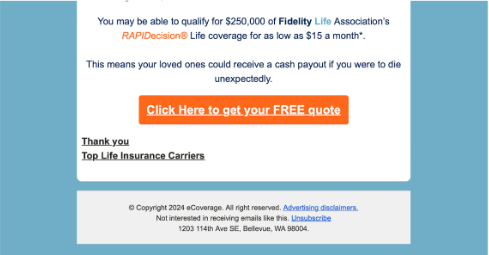
Screenshot provided by the author
The way you format your emails could also set off alarm bells. Overusing ALL CAPS, punctuation, symbols, special characters, unnecessary white space, and emojis can make your emails look suspicious.
Spelling and grammar mistakes, generic phrases (i.e., “click here,” “open now”), and urgency and scarcity tactics can also hurt the credibility of your emails.
Check Your Sender Reputation & Spam Score
Email providers will look at your sender reputation to determine whether your emails will show up in recipients’ inboxes.
The content of your emails, engagement rates, and list quality all affect your sender reputation, which ranges from 1 to 100. An email provider could filter your messages into the spam folder if you have a low sender reputation.
Tools like Sender Score from ReturnPath can help you monitor your sender reputation and see if you’re on a blacklist.
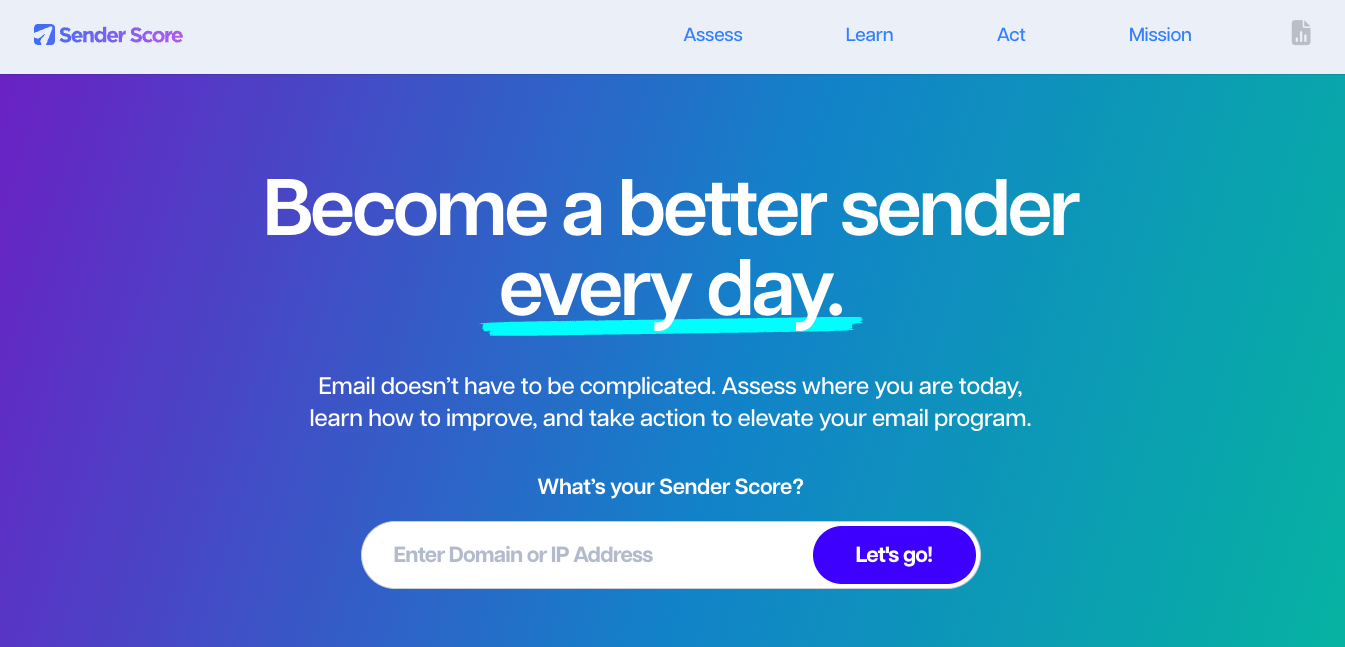
Tools like this allow marketers to monitor domain health and identify deliverability risks before campaigns are affected.
However, monitoring your sender reputation is only part of the equation. Maintaining a healthy email list is just as important for long-term deliverability.
Practice Good Email List Hygiene
Maintaining a clean, high-quality email list is one of the best ways to improve your email deliverability rate.
That means regularly removing invalid or inactive email addresses to reduce bounces. When adding new subscribers to your list, use an email validation service. This will help you verify the accuracy and validity of email addresses. These services can detect typos, invalid domains, and temporary addresses.
To remove inactive email addresses, first, determine what constitutes an inactive subscriber. For example, maybe a subscriber hasn’t opened or clicked one of your emails within the last six months.
You can send re-engagement emails to those inactive subscribers. Remove the ones who don’t respond from your list.
Use Double Opt-in
Double opt-in requires a user to confirm their subscription to your email twice before they become a subscriber.
This ensures subscribers want to receive your emails and verifies that their email address is valid.
Here’s how it works.
1. A user fills out a subscription form on your website or another platform and provides their email address.
2.The user receives an email confirmation link or button.
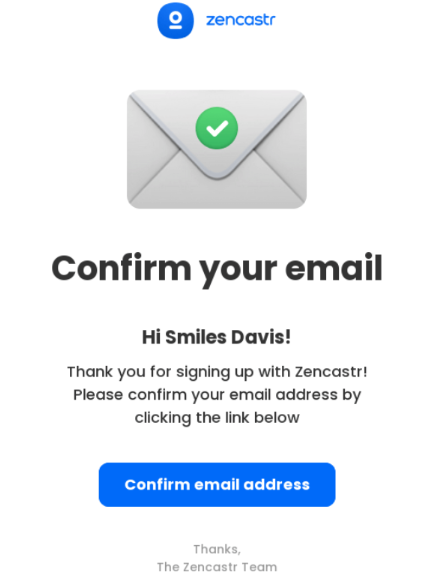
3. The user clicks the link or button in the confirmation email, which verifies their email address and confirms their subscription.

Watch Your Email Engagement Metrics
Great metrics and email performance are the telltale signs of an effective email marketing campaign. Monitoring these metrics consistently can also help you avoid the spam folder over the long term.
But if your email engagement metrics aren’t good, it could spell trouble. Look out for key performance indicators (KPIs) like spam complaints, open rates, click-through rates (CTRs), and delivery rates.
Have too many spam complaints? Remove the addresses reporting your emails as spam to prevent future complaints and damage to your sender reputation.
Are your open rates dropping? Revisit your subject lines and email frequency. You should also test different send times and audience segments to identify patterns that affect engagement and inbox placement.
Click-throughs not where you want them? Focus more on providing value in your emails and providing an incentive for subscribers to click. Strong engagement metrics often start with sending content that subscribers actually find useful and relevant.
Send Targeted, Relevant Email Content
When you send email content that resonates with your target audience’s needs and preferences, ISPs and ESPs will see that your emails are legitimate, relevant to subscribers, and not likely to be spam.
Personalized, targeted emails based on subscriber preferences, behaviors, or demographics mean higher engagement rates and fewer spam complaints.
Take this email from OpenTable, an online reservation service company, for example. The email provides the subscriber with targeted restaurant recommendations based on their location in Nashville.

Screenshot provided by the author
The subscriber is more likely to engage with the email and even visit one of the locations because they live close by.
You can also personalize emails using your recipients’ names, past purchase history, or browsing behavior. This allows you to segment your list for targeted messaging, increasing relevance and reducing spam filter triggers.
Sending relevant content regularly builds trust with recipients and email service providers in time. If recipients are regularly engaged with your emails, the inbox providers are more likely to see your messages as genuine and valuable, not as promotional spam.
Implement Email Authentication Protocols
Authenticating your email can help reduce the likelihood that an ISP or ESP flags your legitimate emails as spam.
Getting past a personal Gmail inbox and getting past a corporate inbox are two very different challenges. Many businesses use additional security layers that evaluate incoming emails similarly to threat detection systems, checking sender reputation, authentication settings, link destinations, and sending behavior.
For legitimate marketers, this matters because poorly configured emails can trigger the same warning signs as phishing attempts, especially when sending to corporate email addresses.
Here are the four main email authentication methods:
- Sender Policy Framework (SPF): SPF helps verify that your IP address is authorized to send emails on behalf of a specific domain. As the domain owner, you’ll publish SPF records in your domain name system (DNS) that specify which servers can send emails from that domain. This helps prevent spoofing and phishing attacks where malicious actors forge sender addresses from legitimate domains.
- DomainKeys Identified Mail (DKIM): DKIM adds a digital signature to emails using a private key, allowing the receiving IP address to verify that the email you sent comes from an authorized sender and that no one has altered the content.
- Domain-based Message Authentication, Reporting & Conformance (DMARC): DMARC builds on SPF and DKIM to provide a policy framework for email authentication and reporting. Both SPF and DKIM are required to send and deliver emails.
- Brand Indicators for Message Identification (BIMI): BIMI is a relatively new email authentication protocol. It attaches to your company logo to enhance brand recognition and provide a visual indicator of authenticity. To use BIMI, implement both SPF and DKIM. You’ll also need DMARC to ensure the email aligns with the domain’s policies.
Make it Easy to Unsubscribe
The last thing you want a recipient to do is unsubscribe from your email list. The whole point of creating an email list is to grow your subscriber base so you can generate leads and, hopefully, new sales.
However, not everyone wants to receive marketing messages. Some people feel like businesses send too many emails too often.
So, always have a transparent unsubscribe process. This helps you reduce spam complaints and keeps your list clean.
Final Thoughts
There are quite a few factors that can affect where your emails end up in your subscribers’ inboxes. As long as you follow these best practices, you should be able to boost your email deliverability so that your emails almost always reach the people you intended to.
And if you’re not sure your emails are actually reaching people, keeping a close eye on engagement metrics can help you catch deliverability problems before they start hurting your results.
Improving email deliverability is an ongoing process that requires consistent monitoring, testing, and optimization. From maintaining a clean email list to implementing authentication protocols, even small improvements can have a major impact on campaign performance over time.
If you want to strengthen your digital marketing strategy even further, explore additional insights into email marketing, SEO, and lead generation on MexSEO.
About the author: Britney Steele

Born and raised in Atlanta, Britney is a freelance writer with 5+ years of experience. She has written for a variety of industries, including marketing, technology, business, finance, healthcare, wellness, and fitness. If she’s not spending her time chasing after three little humans and two four-legged friends, you can almost always find her glued to a book or awesome TV series.
Terms in this guide