
Plagiarism checkers compare your text against web pages and other documents, then flag the passages that match. On a business website the job is practical: check a freelancer’s draft before it goes live, and find out whether someone has copied your pages.
This list covers 10 plagiarism checkers, from free tools such as Dupli Checker and Editpad.org to Copyleaks and Turnitin, and says which job each one suits. If you’re a student checking an essay, our guide to writing plagiarism-free essays fits your situation better.
What counts as plagiarism on a business website?
Plagiarism on a business website means publishing someone else’s text, images or ideas as your own, without permission or credit. Typical cases are a blog post a writer lifted from a competitor, a product description copied from the manufacturer, and a photo taken from another site without a licence.
There are several types of plagiarism. Copying a whole article is complete plagiarism. Stitching sentences from several sources together with a few words changed is mosaic plagiarism, and heavily reworded text is harder for any plagiarism checker to flag than a straight copy.
Plagiarism is not the same as duplicate content. Duplicate content is the same text at more than one URL, often across your own pages, and it’s a technical SEO issue rather than an ethical one.
Why does copied content hurt a business?
Copied content hurts a business in three ways: search visibility, legal exposure and trust. Google’s spam policies list scraped content, meaning pages copied from other sites without adding value, as a violation, and sites that break those policies can rank lower or drop out of results.
The original author can also send a copyright takedown request or take legal action. And a customer who spots the same text on a competitor’s site starts to doubt everything else you say.
In schools and universities the stakes are different. A plagiarism finding can mean a failed assignment, a cancelled thesis or expulsion, depending on the institution’s rules.
The 10 plagiarism checkers and the job each suits
This list keeps the 10 plagiarism checkers this article has always covered, grouped by the job each one suits. We have not tested them ourselves. The notes describe what each vendor offers, not measured accuracy.
Word limits and prices change often, so check the vendor’s own pricing page before you rely on a figure here.
A plagiarism checker does not improve your search engine optimisation by itself. Its job is to stop you publishing copied text. For the wider writing workflow, see our guide to SEO tools for content writing.
| Plagiarism checker | Best fit | Free option | Paid plans |
|---|---|---|---|
| Rephrase.info | Quick checks of short drafts | Yes | See rephrase.info for current paid plans |
| Editpad.org | Free checks with matched sources listed | Yes | See editpad.org for current paid plans |
| Prepostseo | Bundled SEO text tools and a Chrome extension | Yes, with a word limit | See prepostseo.com for current pricing |
| Turnitin | Students and staff through their institution | No individual plan | Licensed to institutions |
| 1Text | Free checks with word and character counts | Yes | See 1text.com for current paid plans |
| Check Plagiarism | Checking several files or a live URL | Yes, with a word limit | See check-plagiarism.com for current pricing |
| Dupli Checker | Free checks of text or a live URL | Yes | See duplichecker.com for current paid plans |
| Plagiarism Checker X | Desktop software and side-by-side comparison | Yes, limited | See plagiarismcheckerx.com for current pricing |
| Plagiarisma.net | Free second opinion on text, files or URLs | Yes | Check plagiarisma.net for current availability |
| Copyleaks | Teams, many languages, AI-writing detection | Free trial available, see copyleaks.com for terms | See copyleaks.com for current pricing |
Rephrase.info
 Rephrase.info is a free online plagiarism checker that also rewrites text, as its name suggests. You paste text or upload a file, pick the language, pass the reCAPTCHA and run the check.
It suits a quick look at a short blog draft. Be careful with the rewrite feature: rewording someone else’s text without credit is still plagiarism, and it adds nothing a reader can’t already find on the original page.
Rephrase.info at a glance
- Free to use, with the report shown on screen.
- Checks a limited number of words per check, so see rephrase.info for the current limit.
- Supports several languages.
- Highlights matching passages in red.
Editpad.org
 Editpad.org is a free collection of online writing tools, and its plagiarism checker works the same way as Rephrase.info: paste or upload, choose a language, pass the reCAPTCHA.
The report is the useful part. It shows the share of unique and matching text and lists the sources the matches came from, so you can see whether a writer copied one competitor or several pages.
Editpad.org at a glance
- Lets you choose the language of the text.
- Shows the percentage of unique and matching content.
- Lists the sources behind each match.
- Sits alongside other free writing tools on the same site.
Prepostseo.com
 Prepostseo bundles a plagiarism checker with other SEO and writing tools. You can paste text or pull files from your device, Google Drive or OneDrive.
Two settings matter for web copy. Exclude quotes, so properly quoted passages don’t count against you. Exclude a URL, so your own published page isn’t flagged as the source when you recheck it.
Prepostseo also offers a “Make it unique” rewrite option. Use it as a prompt for your own rewrite, not as a fix, because automated rewording leaves the ideas and structure of the original intact.
Prepostseo at a glance
- Has a word limit in the free version and a higher limit on a premium plan, so see prepostseo.com for the current limits.
- Accepts uploaded files as well as pasted text.
- Offers a Chrome extension.
- Lets you exclude quotes and specific URLs from the check.
Turnitin
 Turnitin is the plagiarism checker most universities use, and it’s licensed to institutions rather than sold to individuals. Students submit work through their school’s account, and teachers see a similarity report.
The report gives a similarity percentage and splits the matches into internet sources, publications and student papers, with a downloadable PDF version.
A Turnitin similarity score is not a plagiarism verdict. Quotes, references and common phrases all count toward the percentage, so a person still has to read the matches.
For a business, Turnitin is the wrong tool. Publishers and researchers use iThenticate, Turnitin’s product for manuscripts. Check Turnitin’s site for current availability and pricing.
Turnitin at a glance
- Compares work against web pages, publications and previously submitted student papers.
- Available only through a school, university or other licensed institution.
- Shows the word count and character count of the submission.
- Lists the sources each match came from.
1Text
 1Text is an online plagiarism checker: paste your text into the box and run the check. Check the tool’s own site for its current pricing and any free usage limits.
The result includes word and character counts and flags text pieced together from several sources or loosely paraphrased. It also suggests grammar and punctuation fixes, which makes it a reasonable last pass on a short article.
1Text at a glance
- Reports character count, word count and count without spaces.
- Flags text combined from several sources and weak paraphrasing.
- Suggests changes to improve the text.
- Points out grammar and punctuation mistakes.
Check Plagiarism
 Check Plagiarism (check-plagiarism.com) accepts pasted text, uploaded files or a URL. The URL option is handy when you want to check a live page rather than a draft.
You pass a reCAPTCHA, run the check and get the results on screen. Read the vendor’s privacy policy to see how it handles your text, and check the site for the current limit on how many files you can check at a time.
Like several tools here, it also offers rewriting and paraphrasing.
Check Plagiarism at a glance
- Free checks are limited to a set number of words per submission, and premium plans raise that limit. Check the current limits on check-plagiarism.com.
- Accepts several file formats.
- Includes a rewriter and paraphraser alongside the checker.
- Shows word and character counts.
Dupli Checker
 Dupli Checker is a plagiarism checker for everyday checks. You paste text, upload a file or enter a URL, then click Check Plagiarism. A word limit per check may apply, so check the tool’s site for the current limit.
The URL option is the one to try when you suspect another site copied your page. Enter your own URL and see which other pages match its text.
Dupli Checker at a glance
- Free to use for text, files and URLs.
- Includes a grammar checker on the same site.
- Sits alongside other free SEO tools on the same site.
Plagiarismcheckerx
 Plagiarism Checker X is desktop software. Check plagiarismcheckerx.com for the current editions, supported platforms and pricing. You load a document and the software checks it against the web.
Its most useful feature for a business is side-by-side comparison of two documents. If a freelancer’s article reads like a page you’ve seen before, put both texts next to each other and see exactly where they overlap.
Plagiarism Checker X at a glance
- Works with common document formats.
- Supports several languages.
- Highlights matches in different colours.
- Compares two documents side by side.
Plagiarisma.net
 Plagiarisma.net is a plagiarism checker that takes pasted text, uploaded files or a website URL. Check the site for its current features and any usage limits.
It’s a basic tool with a plain interface. Use it for a second opinion when another free checker gives an unclear result, since different tools search different sources.
Plagiarisma.net at a glance
- Free to use.
- Plain, simple interface.
- Can search academic sources as well as the web. Check the tool’s site for which sources are currently included.
- Includes a rewriting tool.
Copyleaks
 Copyleaks is an AI-based plagiarism checker built for schools and businesses, with an API for teams that check content at volume. Paste text or upload a file and run the scan.
Copyleaks flags close paraphrasing as well as exact copies, and it also offers AI-writing detection. That matters if you buy articles from freelancers who draft with AI writing tools. Treat an AI-detection score as a reason to ask questions, not as proof.
Copyleaks at a glance
- Detects close paraphrasing as well as exact matches.
- Shows the percentage of identical and related content.
- Offers AI-generated text detection alongside plagiarism checks.
- Supports many languages. Check copyleaks.com for the current list.
Do you need a plagiarism checker at all?
A plagiarism checker earns its place when you publish text you didn’t write yourself: freelance articles, agency copy, guest contributions or AI-assisted drafts. If you write every page yourself from your own knowledge, an occasional free check is enough.
For a quick spot check, Google works as a free plagiarism checker. Copy one distinctive sentence, put it in quotation marks and search for it. Any page with the same sentence shows up in the results.
The same search finds sites that copied you, so run it on your best page every few months. If you republish your own articles on other sites, ask those sites to add a canonical tag pointing back to your original, as Google explains in its guide to consolidating duplicate URLs.
How to read a plagiarism report
A plagiarism report is a list of matches, and the percentage at the top is only a starting point. Work through the matches in this order before you change anything:
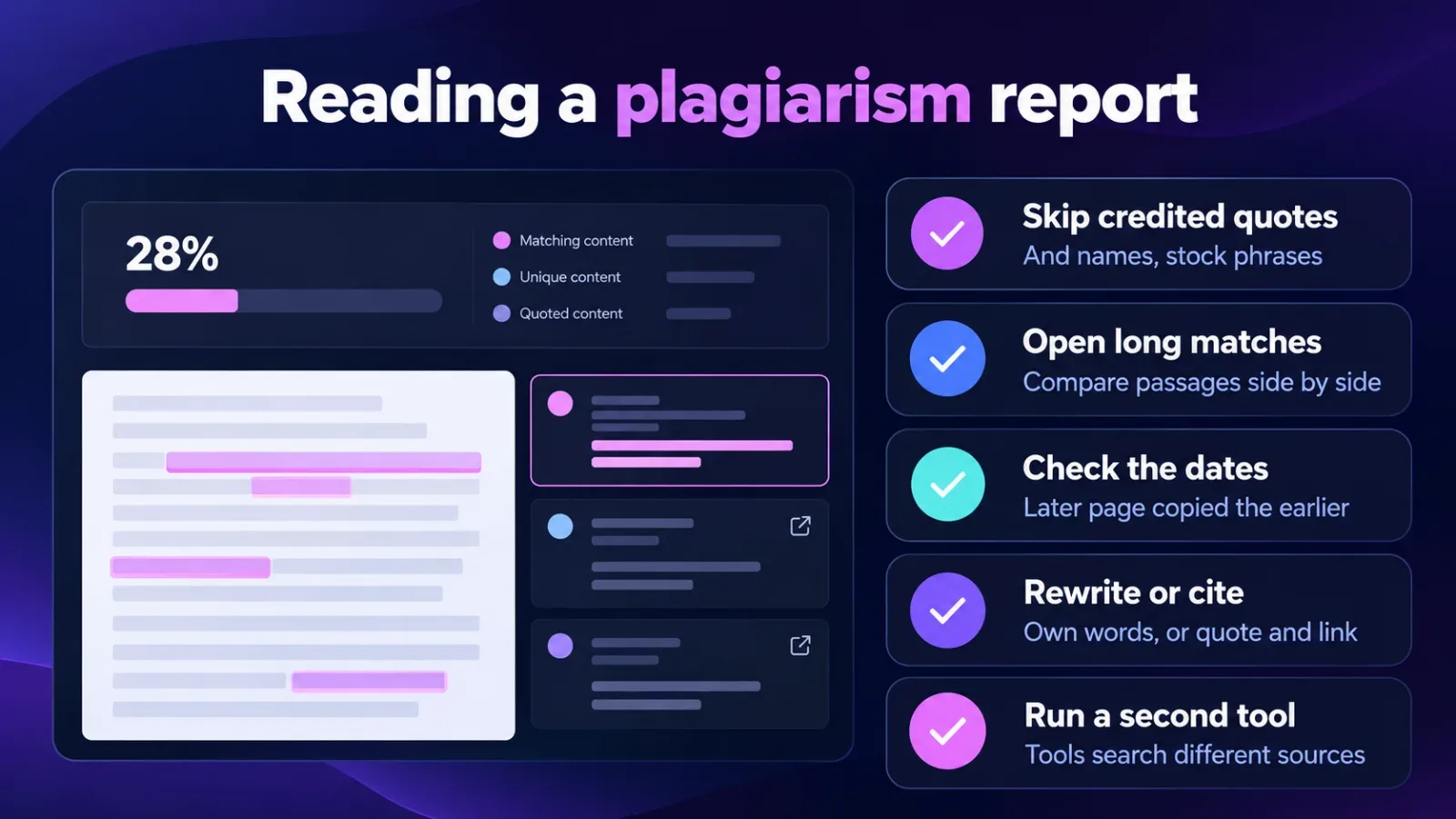
- Skip matches on quotes you’ve credited, product names and stock phrases such as addresses.
- Open each source with a long match and compare the passages side by side.
- Check the dates: the page that appeared later is usually the copy.
- Rewrite flagged passages from your own knowledge, or quote and link the source.
- Run the revised text through a second plagiarism checker, because tools search different sources.
No similarity percentage is safe by default. One paragraph copied word for word is a bigger problem than a high score made up of common phrases.
Check your next freelance article before it goes live
Pick one free plagiarism checker from the table and run your next bought-in article through it before you publish. Then search one sentence from your top page in quotation marks to see whether anyone has copied it.
If both checks come back clean, add them to your publishing checklist so they happen every time. For the bigger picture of planning content that earns its place in search, read our guide to effective content marketing strategies.
Frequently asked questions
Can I use Turnitin without a school or university?
No, Turnitin sells its plagiarism checker to institutions, not to individuals. Students get access through their school’s account. Publishers and researchers who need a similar check use iThenticate, Turnitin’s tool for manuscripts.
Does Google penalise duplicate content?
Google doesn’t penalise ordinary duplicate content, such as the same product text on two of your own URLs. It picks one version to show in results. Scraped content is different: copying other sites’ pages without adding value breaks Google’s spam policies, and those pages can rank lower or disappear.
Can a plagiarism checker tell if text was written by AI?
A plagiarism checker finds matching text, not AI writing, so an AI draft can pass with a clean score. Some tools, including Copyleaks and Turnitin, add separate AI-writing detection. Those scores produce false positives, so use them to start a conversation with the writer rather than to accuse anyone.
Is paraphrased text still plagiarism?
Yes, paraphrased text is plagiarism when the ideas and structure come from one source and you don’t credit it. Rewording tools change the words but leave the original argument in place. Write from your own knowledge, or quote the source and link to it.
Are free plagiarism checkers good enough for a business website?
Free plagiarism checkers are enough for occasional checks of short blog posts. Their word limits start to slow you down when you check many long articles a month. At that point a paid plan, or a tool with an API such as Copyleaks, saves time.
Terms in this guide