Picuki is a web-based Instagram viewer and editor that allows you to browse public profiles, Stories, and hashtags without logging into an account. You can inspect public posts anonymously, download high-resolution photos and videos, and use basic editing tools directly in your browser. This guide explains how to use Picuki, what its limitations are, and how it compares to alternative Instagram viewers.
What is Picuki?
Picuki is an online search engine and viewer designed for public Instagram content. You enter a username, hashtag, or location to view posts and Stories without logging into an account or alerting the creator.
The platform accesses publicly accessible web data and offers several core capabilities:
- Anonymous viewing of public Instagram profiles and active Stories
- Downloading public photos, videos, and Stories directly to your device
- Basic photo editing tools for public images, including cropping, saturation adjustments, and filters
- Search filtering by usernames, tags, and locations
- Display of public engagement figures such as follower counts, likes, and comments
Marketers use Picuki to research competitor campaigns and visual trends without creating burner accounts or triggering view receipts.
Why use Picuki?
The main advantage of Picuki is convenience: you do not need an Instagram account or active login session to inspect public profiles. This prevents your personal profile from appearing in Story viewer lists. Picuki also allows you to save high-resolution public images directly to your computer or phone and apply quick visual adjustments before saving.
Getting started with Picuki
Using Picuki requires no software downloads, browser extensions, or account registration. The tool runs directly within modern desktop and mobile browsers.
Follow these steps to view an account:
- Visit the official Picuki website in your browser.
- Type the target username, hashtag, or search term into the search bar.
- Select the matching profile from the search results to see their posts and active Stories.
Picuki retrieves public content without notifying the account owner. If you only need to check temporary posts, dedicated tools like the Instanavigation anonymous Instagram Story viewer offer a similar web-based workflow.
How to browse an Instagram profile without logging in
Follow these steps to view public profiles without logging in:
- Open your web browser and go to the Picuki homepage.
- Enter the exact Instagram handle in the search bar and press search.
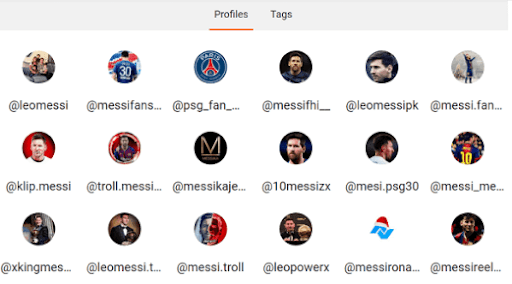
- Click on the target profile from the list of matching accounts.
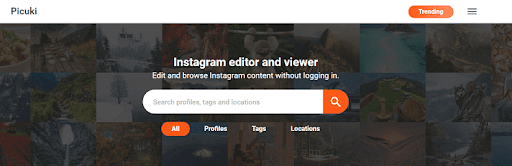
- Browse the public grid to view images, captions, comments, and follower metrics.
How to search Instagram posts by hashtag
To explore content around a specific topic or campaign using hashtags:
- Go to the Picuki homepage.
- Enter your search keyword or hashtag into the search bar.
- Click the Tags tab above the search results.
- Select the desired hashtag from the list to view post volume.
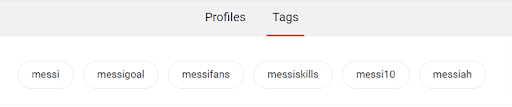
- Review all public posts shared under that hashtag in chronological order.

How to edit Instagram photos with Picuki
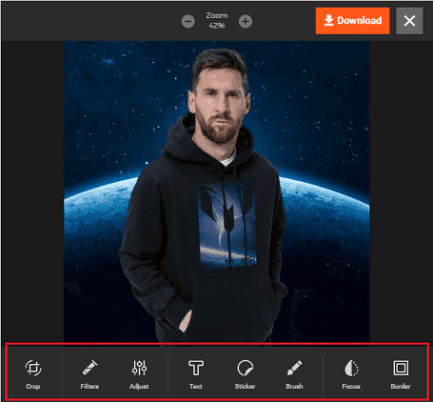
Picuki includes an in-browser image editor for public posts:
- Search for the profile hosting the image you want to modify.
- Click the specific photo in the account gallery.
- Select the Edit option located beneath the image.

- Use the editor toolbar to adjust brightness, saturation, and contrast, or crop the image.

- Apply preset filters or text overlays, then download the modified file to your device.
How to view trending Instagram content
Picuki tracks popular posts and topics across public profiles:
- Open the Picuki website.
- Click the Trending button in the navigation header.
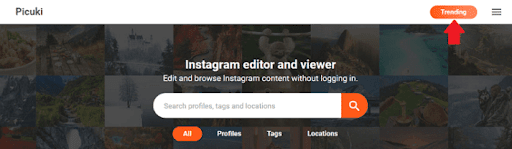
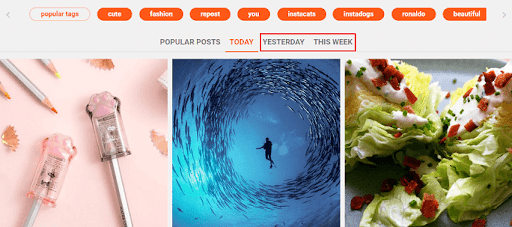
- Examine top-performing public posts filtered by popularity.
- Toggle between recent time windows to discover rising trends or viral tags.
How to download Instagram images and videos
Follow these steps to save public media for offline reference:
- Navigate to the public profile containing the media you need.
- Click on the image, Reel, or video post.
- Click the Download button below the media player to save the file.

How to view Instagram Stories anonymously
To watch active Stories without appearing in the viewer log:
- Search for the target public account on Picuki.
- Click the Stories button on the profile header.
- Click on any active Story slide to play or view it.
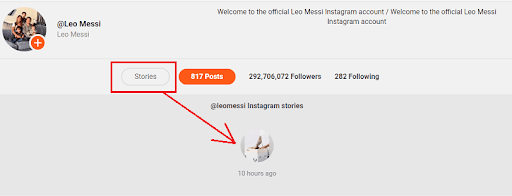
- View or download the Story before the 24-hour expiration window closes.
Limitations of Picuki and private accounts
Picuki only accesses public Instagram data. It cannot view private profiles, private Stories, or direct messages. If an account is set to private, Picuki displays an error or an empty grid.
The platform also operates strictly as a read-only viewer. You cannot like posts, leave comments, or send messages. Because Picuki scrapes public endpoints, it also experiences periodic downtime when Instagram refreshes its security protocols.
Security and privacy: is Picuki safe to use?
Because Picuki requires no account registration or credentials, it poses minimal security risk to your personal Instagram account. You never provide your password or authentication tokens, which prevents account takeover or credential leaks.
Understanding its privacy model requires separating user safety from site safety:
No login credentials needed
You browse without signing in, so your personal Instagram profile is never linked to your search history or viewing activity.
Browser-side security and encryption
Picuki serves traffic over standard HTTPS encryption. Never download executable files or browser extensions claiming to unlock extra Picuki features.
Anonymity for Story views
Viewing public Stories through Picuki does not add your handle to the publisher’s viewer list, keeping your identity private.
Third-party advertising considerations
Picuki is monetized through third-party display advertisements. Use an ad blocker and avoid clicking on misleading pop-ups or external download prompts while browsing.
Picuki mobile compatibility and access
Picuki does not offer an official mobile app on the Apple App Store or Google Play Store. Any app using the Picuki name in mobile app stores is an unauthorized clone.
To use Picuki on an iPhone, iPad, or Android device, access it directly through Safari, Chrome, or any standard mobile browser:
- Open your preferred mobile web browser.
- Navigate to the Picuki website.
- Search for a public profile or hashtag using the mobile interface.
The mobile web version retains the same features as the desktop site, allowing you to browse media and save images directly to your mobile camera roll.
Top Picuki alternatives when the site is down
- SmiHub
- Pixwox
- Gramhir
- Dumpor
- InsAnony
If Picuki fails to load or returns server errors, these alternative Instagram viewers provide comparable public browsing features:
SmiHub
SmiHub functions similarly to Picuki as an anonymous web-based Instagram viewer. It lets you inspect public profiles, Stories, and Reels without signing in. Like Picuki, SmiHub is completely free and requires no account setup, making it a reliable backup when Picuki experiences rate-limit downtime.
Pixwox
Pixwox Instagram viewer is a dedicated viewer and downloader for public Instagram profiles. It allows you to search accounts by username or URL and download full-resolution posts, Stories, and Reels without needing an active Instagram login.
Gramhir
Gramhir profile analyzer (formerly Gramho) combines public profile viewing with basic account statistics. In addition to displaying posts and Stories, it calculates an account popularity score and averages for likes and comments, which helps marketers evaluate influencer profiles without logging in.
Dumpor
Dumpor anonymous Story viewer is dedicated to watching and downloading public Stories and posts without leaving a trace. It features a minimalist interface that loads quickly and offers clean media downloads.
InsAnony
<a href=”https://www
Troubleshooting Resources & Support Channels of Picuki
Despite Picuki’s robust infrastructure and user-friendly design, users may encounter issues or require additional support. To ensure a seamless experience, Picuki offers various troubleshooting resources and support channels.
FAQs and Knowledge Base
Picuki maintains a comprehensive knowledge base and a frequently asked questions (FAQs) section, addressing common issues and providing step-by-step solutions.
Community Forums
The platform’s dedicated forums allow users to engage with fellow Picuki users, share tips and tricks, and seek advice from the vibrant Picuki community.
Customer Support
For more complex issues or personalised assistance, Picuki offers responsive customer support via email or live chat, ensuring your concerns are addressed promptly by knowledgeable support representatives.
During technical difficulties or service disruptions, Picuki’s support channels are readily available to guide you through troubleshooting steps or provide updates on service status.
Also Read: Inflact: Marketing Business tool for Instagram
Conclusion
In the ever-evolving social media landscape, Picuki emerges as a game-changer, empowering users to explore Instagram content anonymously while maintaining their privacy and discretion. Picuki offers a comprehensive suite of tools and features catering to diverse needs, from casual browsing to advanced content analysis and management. Whether you’re a digital marketer seeking competitive insights, a content creator in search of inspiration, or simply an individual with a desire for anonymous exploration, Picuki provides a secure and user-friendly platform to navigate the vibrant world of Instagram.
With its robust security measures, seamless mobile compatibility, and constantly evolving feature set, Picuki stands as a testament to the power of innovation in social media. Embrace the freedom of anonymous Instagram browsing and embark on a journey where privacy and creativity converge.
FAQs:
Is Picuki anonymous?
Indeed, Picuki truly protects your anonymity. The owner of the Instagram profile will never learn about your views, personal information, or the time and date of your visits, as these details are never recorded.
Why is Picuki not working?
Picuki is gaining increasing popularity every day, and as a result, more people are visiting the website. Some of the functions may cease functioning if the server experiences an increase in traffic. The issue can be resolved by trying again later or by clearing the browser or app cache.
How do you fix a Picuki error?
Reloading the page, emptying the app and website cache, or waiting a while will all quickly fix a Picuki problem.
Is Picuki safe?
Indeed, using Picuki to explore open Instagram profiles secretly is safe and legal.
Is picuki.com free?
Indeed, the Instagram viewer and editor on picuki.com is free. Without logging in, you can browse and modify public Instagram profiles. Also, you can do it indefinitely.
Terms in this guide